Skip to content

Daniel Crawford's Data Blog

Tips for performant database designs

Menu
  • Home
  • Blog
  • Resources
  • About
  • Contact
Menu

Synapse Fundamentals – Table Creation Made Easy

Posted on September 27, 2022September 5, 2025 by Daniel Crawford

One of the most common issues encountered with Azure Synapse Dedicated SQL Pools is the confusion of table creation.  The confusion stems from separating how a table is stored from where it is stored.  I have already talked a little bit about this in previous posts (regarding distribution and indexing) but I want to dedicate this post to adding some clarity on the topic. 

First, let’s take a look at the table creation statement in very simple generic form:

CREATE TABLE [TableName]
([col1] datatype, [col2] datatype, …)
WITH (DISTRIBUTION=[distribution type], [index type])

The two key components for Synapse Dedicated SQL Pools are within the WITH clause:  1.) Distribution and 2.) Index.  Every table has these two properties even if they are not declared explicitly.  Synapse will default the distribution type to Round Robin and will default the index to a Clustered Columnstore Index  (CCI) if not explicitly defined. 

I typically describe these two properties as follows. 

  • A distribution type is where data is stored physically.  When data is inserted, is it stored on the next distribution available (Round Robin) or is it stored on a specific distribution determined by a hash key and algorithm (Hash distributed).  Replicated tables are a variation of round robin tables with a caching layer over the top.
  • An index type determines how data is stored.  First, is it stored in rowstore format in pages (clustered Index/heap) or is it stored in columnar compressed format (CCI)?  Secondarily, is there any ordering to the data?  The ordering will determine if the table is a (CCI vs Ordered CCI and Clustered Index vs Heap). 

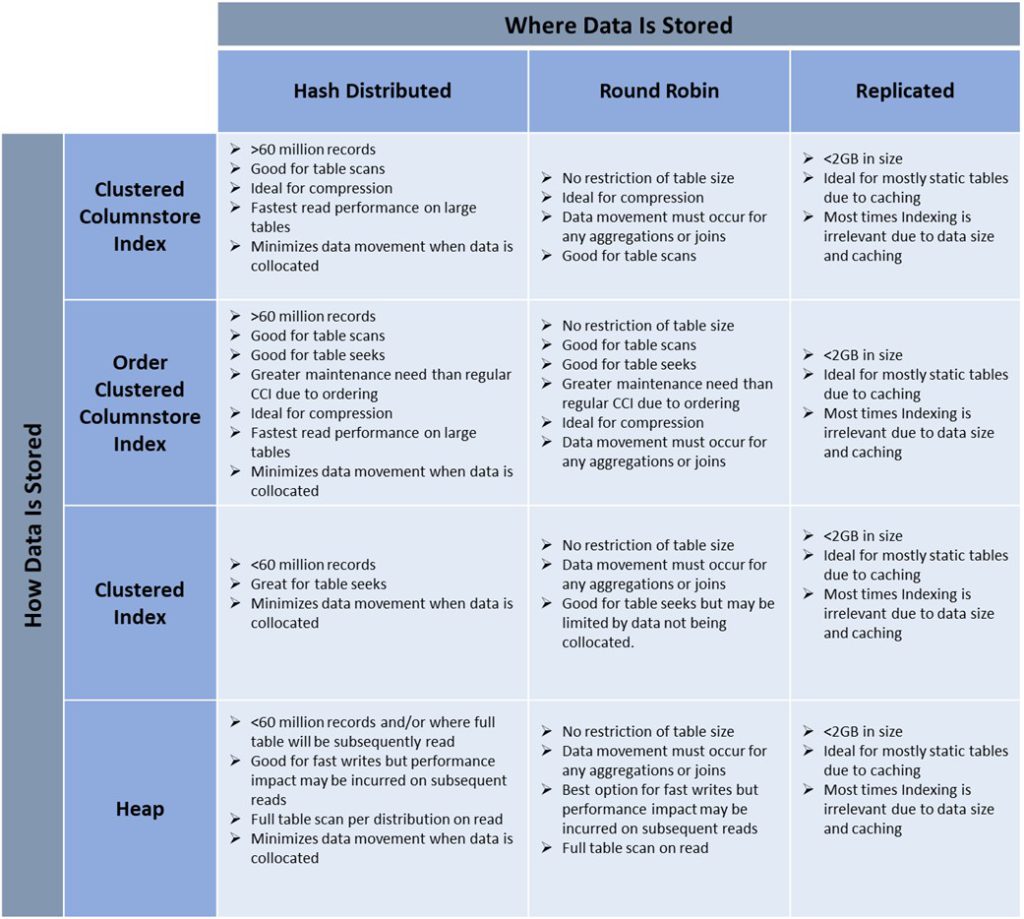
To simplify and illustrate the above concepts, I typically walk through a chart like the one below.  This forces you to think about the impact of choosing specific distribution and indexing types.  Note that this chart is academic and may not apply to edge cases or unique scenarios.  It is however a good place to start when you are in the beginning stages of creating your table schema and understanding the performance impacts of those choices. Use the below matrix as a starting point. Expand on the characteristics and best practices listed below that the different index and distribution types bring when creating tables in your own environment.
Loading

Categories

  • Architecture Patterns
  • Fabric
  • Performance Tuning
  • Synapse
  • Top 10 Performance Considerations

Archives

  • July 2023
  • January 2023
  • December 2022
  • November 2022
  • September 2022
  • August 2022

Recent Synapse Videos

In this video Bogdan joins Stijn to talk about Microsoft Fabric performance and what happens underneath the hood while processing a query! <br /><br />  <br /><br />Polaris white paper: https://www.vldb.org/pvldb/vol13/p3204-saborit.pdf <br /><br />  <br /><br />Bogdan Crivat - VP Synapse Analytics<br /><br />https://twitter.com/bogdanC_guid <br /><br />https://www.linkedin.com/in/bogdanc/ <br /><br />  <br /><br />Stijn Wynants - Senior Product Manager <br />https://www.linkedin.com/in/stijn-wynants-ba528660/ <br />https://sql-stijn.com/ <br />https://twitter.com/SQLStijn
Performance at Scale with Microsoft Fabric: Query Processing!
As part of our Fabric Espresso series, we're diving deep into the realm of Data Engineering and Data Science. Join us as our senior product managers - Estera Kot, Ted Vilutis, and Stijn Wynants discuss the crucial features of Microsoft Fabric that every data engineer should know about! <br /><br />From insights into data engineering within Microsoft Fabric to decision guides for copying data into Fabric, and shortcuts that point to other storage locations - we've got it all covered in this exciting new video. <br /><br />Check out these key resources for a deep dive: <br /><br />👉 Data Engineering in Microsoft Fabric: https://learn.microsoft.com/en-us/fabric/data-engineering/data-engineering-overview  <br /><br />👉 Decision Guide to Copy Data into Fabric: https://learn.microsoft.com/en-us/fabric/get-started/decision-guide-pipeline-dataflow-spark <br /><br />👉 Shortcuts to Other Storage Locations: https://learn.microsoft.com/en-us/fabric/onelake/onelake-shortcuts <br /><br />  <br /><br />Meet the Speakers: <br /><br />1️⃣ Stijn Wynants: Senior Product Manager at Microsoft <br /><br />LinkedIn: https://www.linkedin.com/in/stijn-wynants-ba528660/ <br /><br />Twitter: https://twitter.com/SQLStijn <br /><br />Blog: https://sql-stijn.com/ <br /><br />  <br /><br />2️⃣ Estera Kot: Senior Product Manager at Microsoft <br /><br />LinkedIn: https://www.linkedin.com/in/esterakot/ <br /><br />Twitter: https://twitter.com/estera_kot <br /><br />  <br /><br />3️⃣ Ted Vilutis: Senior Product Manager at Microsoft <br /><br />LinkedIn: https://www.linkedin.com/in/tedvilutis/ <br /><br />Twitter: https://twitter.com/tvilutis <br /><br />  <br /><br />Don't miss out on this opportunity to learn directly from the Microsoft Fabric Product Group Team and elevate your data engineering skills with Microsoft Fabric! 🚀
Top Microsoft Fabric Features that Every Data Engineer Should Know
Welcome to our Fabric Espresso series! In this video Ambika joins Stijn to talk about table clone in Warehouse within Microsoft Fabric. We will talk a bit more deep on what is a table clone, when and how to use a table clone.<br /><br />Clone table: https://learn.microsoft.com/fabric/data-warehouse/clone-table<br />Clone table using T-SQL: https://learn.microsoft.com/fabric/data-warehouse/tutorial-clone-table<br />CREATE TABLE AS CLONE OF: https://learn.microsoft.com/sql/t-sql/statements/create-table-as-clone-of-transact-sql?view=fabric<br /><br />Ambika Jagadish - Product Manager for Warehouse in Microsoft Fabric<br />www.linkedin.com/in/ambikajagadish
Fabric Espresso: Table clone in Warehouse within Microsoft Fabric
Welcome to the fourth video in our How To series for Real-Time Analytics in Microsoft Fabric!<br /><br />In this video, Guy Reginiano, a Product Manager for Synapse Real-Time Analytics in Microsoft Fabric, will show you how to get data from Azure Event Hubs into a Real-Time Analytics KQL database in Microsoft Fabric.<br /><br />00:07 Introduction<br />00:25 Basic definitions<br />01:12 Event Hubs ingestion demo<br />06:34 Interact with the ingested data using KQL<br />07:54 Create a Cloud Connection in Fabric<br />10:24 Wrap-Up<br /><br />#microsoftfabric #synapserealtimeanalytics
Synapse Real-Time Analytics: Stream data from Event Hubs into a KQL database for powerful analytics
Welcome to our Fabric Espresso series! In this video Bogdan joins Stijn to talk about Microsoft Fabric and what place Azure Synapse has in all of this. We will talk a bit more deep on the engine that was created for Fabric Warehouse and how it compares to Dedicated SQL Pools!<br /><br />Polaris white paper: https://www.vldb.org/pvldb/vol13/p3204-saborit.pdf<br /><br />Bogdan Crivat - VP Synapse Analytics<br />https://twitter.com/bogdanC_guid<br />https://www.linkedin.com/in/bogdanc/<br /><br />Stijn Wynants - Senior Program Manager<br />https://www.linkedin.com/in/stijn-wynants-ba528660/<br />https://sql-stijn.com/<br />https://twitter.com/SQLStijn
Fabric Espresso: Will Fabric replace Azure Synapse?
Load More... Subscribe
This error message is only visible to WordPress admins

Cannot collect videos from this channel. Please make sure this is a valid channel ID.