Skip to content

Daniel Crawford's Data Blog

Tips for performant database designs

Menu
  • Home
  • Blog
  • Resources
  • About
  • Contact
Menu

Synapse Dedicated SQL Pool Execution Plans

Posted on August 4, 2022September 5, 2025 by Daniel Crawford

Synapse execution plans are specifically for distributed SQL (DSQL) and are not the same as SQL Server execution plans.  SQL Server execution plans show the types of join patterns (hash, nested, loop), bookmark lookups, sorts, etc…  Whereas Synapse execution plans show you how data must move between the different distributions of a Synapse Dedicated SQL Pool to co-mingle data and complete a query. 

A DSQL execution plan is a serial task list which coordinates steps that make calls to each of the 60 distributions which have their own SQL plans.  When performance tuning Synapse Dedicated SQL Pools the number one goal is to limit data movement between distributions.  Data movement is usually the most costly task in a DSQL plan and therefore the easiest place to make a big performance impact fast.  The first step to reviewing the execution plan is to get the execution plan for which there are three methods:

  1. In SQL Server Management Studio use “Display Estimated Execution Plan” – this is the same as the old SQL methodology of showing the execution plan but for Synapse it shows the distributed SQL plan.
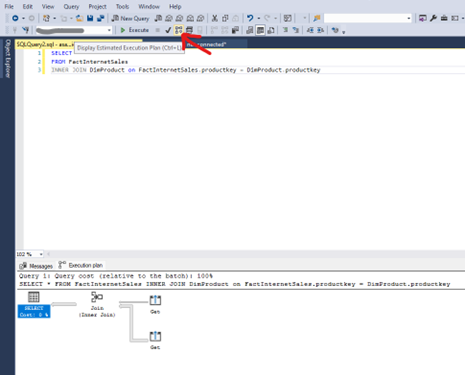
  1. You can use the keyword “EXPLAIN” before any select statement to show you all of the steps, the fields that datasets are redistributed on, and the estimated cost of each step. 

This is the most detailed plan provided but may be limited by your query editor (only 4000 characters returned).  The best way around this is to leverage SQLCMD and use the following parameters:

  • -i for input file (put your query with the EXPLAIN keyword in a script file)
  • -y for variable length type display width
  • -o for output of the entire XML plan – this can be really big for complex queries, so it is best to output it to an XML file and review it in a separate text editor.

  1. After your query has executed you can check the actual query steps in DMV’s:
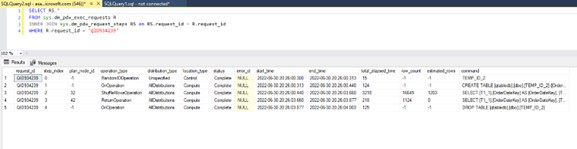
So now we have the dsql execution plan.  What does it mean? 

There are some immediate red flags to look out for. 

  1. Look at the cost for each operation in the XML plan or the elapsed time for each operation from the sys.dm_pdw_request_steps DMV.  The longest running or the most costly operation is where you will want to start.  Analyze the estimated number of rows compared to the actual row count of the table involved in the specific data movement operation.  If it is drastically wrong, you will want to update statistics so the Optimizer can better determine cost of moving tables and therefore move the smaller of the two datasets to complete the query.
  2. If you see long running Return operations, it likely indicates one of two issues:
    • Indexes are not optimal and therefore the final queries running on individual distributions are working against fragmented indexes.  Simply rebuild your index.
    • The client application is not able to receive the result set (think aync_network_io from SQL Server) efficiently.  This could be due to network, or could be due to memory limitations on the client machine.

The execution plans can tell you much more than just this, but those topics will be covered in later posts as we dig into actual query tuning steps.

Loading

Categories

  • Architecture Patterns
  • Fabric
  • Performance Tuning
  • Synapse
  • Top 10 Performance Considerations

Archives

  • July 2023
  • January 2023
  • December 2022
  • November 2022
  • September 2022
  • August 2022

Recent Synapse Videos

In this video Bogdan joins Stijn to talk about Microsoft Fabric performance and what happens underneath the hood while processing a query! <br /><br />  <br /><br />Polaris white paper: https://www.vldb.org/pvldb/vol13/p3204-saborit.pdf <br /><br />  <br /><br />Bogdan Crivat - VP Synapse Analytics<br /><br />https://twitter.com/bogdanC_guid <br /><br />https://www.linkedin.com/in/bogdanc/ <br /><br />  <br /><br />Stijn Wynants - Senior Product Manager <br />https://www.linkedin.com/in/stijn-wynants-ba528660/ <br />https://sql-stijn.com/ <br />https://twitter.com/SQLStijn
Performance at Scale with Microsoft Fabric: Query Processing!
As part of our Fabric Espresso series, we're diving deep into the realm of Data Engineering and Data Science. Join us as our senior product managers - Estera Kot, Ted Vilutis, and Stijn Wynants discuss the crucial features of Microsoft Fabric that every data engineer should know about! <br /><br />From insights into data engineering within Microsoft Fabric to decision guides for copying data into Fabric, and shortcuts that point to other storage locations - we've got it all covered in this exciting new video. <br /><br />Check out these key resources for a deep dive: <br /><br />👉 Data Engineering in Microsoft Fabric: https://learn.microsoft.com/en-us/fabric/data-engineering/data-engineering-overview  <br /><br />👉 Decision Guide to Copy Data into Fabric: https://learn.microsoft.com/en-us/fabric/get-started/decision-guide-pipeline-dataflow-spark <br /><br />👉 Shortcuts to Other Storage Locations: https://learn.microsoft.com/en-us/fabric/onelake/onelake-shortcuts <br /><br />  <br /><br />Meet the Speakers: <br /><br />1️⃣ Stijn Wynants: Senior Product Manager at Microsoft <br /><br />LinkedIn: https://www.linkedin.com/in/stijn-wynants-ba528660/ <br /><br />Twitter: https://twitter.com/SQLStijn <br /><br />Blog: https://sql-stijn.com/ <br /><br />  <br /><br />2️⃣ Estera Kot: Senior Product Manager at Microsoft <br /><br />LinkedIn: https://www.linkedin.com/in/esterakot/ <br /><br />Twitter: https://twitter.com/estera_kot <br /><br />  <br /><br />3️⃣ Ted Vilutis: Senior Product Manager at Microsoft <br /><br />LinkedIn: https://www.linkedin.com/in/tedvilutis/ <br /><br />Twitter: https://twitter.com/tvilutis <br /><br />  <br /><br />Don't miss out on this opportunity to learn directly from the Microsoft Fabric Product Group Team and elevate your data engineering skills with Microsoft Fabric! 🚀
Top Microsoft Fabric Features that Every Data Engineer Should Know
Welcome to our Fabric Espresso series! In this video Ambika joins Stijn to talk about table clone in Warehouse within Microsoft Fabric. We will talk a bit more deep on what is a table clone, when and how to use a table clone.<br /><br />Clone table: https://learn.microsoft.com/fabric/data-warehouse/clone-table<br />Clone table using T-SQL: https://learn.microsoft.com/fabric/data-warehouse/tutorial-clone-table<br />CREATE TABLE AS CLONE OF: https://learn.microsoft.com/sql/t-sql/statements/create-table-as-clone-of-transact-sql?view=fabric<br /><br />Ambika Jagadish - Product Manager for Warehouse in Microsoft Fabric<br />www.linkedin.com/in/ambikajagadish
Fabric Espresso: Table clone in Warehouse within Microsoft Fabric
Welcome to the fourth video in our How To series for Real-Time Analytics in Microsoft Fabric!<br /><br />In this video, Guy Reginiano, a Product Manager for Synapse Real-Time Analytics in Microsoft Fabric, will show you how to get data from Azure Event Hubs into a Real-Time Analytics KQL database in Microsoft Fabric.<br /><br />00:07 Introduction<br />00:25 Basic definitions<br />01:12 Event Hubs ingestion demo<br />06:34 Interact with the ingested data using KQL<br />07:54 Create a Cloud Connection in Fabric<br />10:24 Wrap-Up<br /><br />#microsoftfabric #synapserealtimeanalytics
Synapse Real-Time Analytics: Stream data from Event Hubs into a KQL database for powerful analytics
Welcome to our Fabric Espresso series! In this video Bogdan joins Stijn to talk about Microsoft Fabric and what place Azure Synapse has in all of this. We will talk a bit more deep on the engine that was created for Fabric Warehouse and how it compares to Dedicated SQL Pools!<br /><br />Polaris white paper: https://www.vldb.org/pvldb/vol13/p3204-saborit.pdf<br /><br />Bogdan Crivat - VP Synapse Analytics<br />https://twitter.com/bogdanC_guid<br />https://www.linkedin.com/in/bogdanc/<br /><br />Stijn Wynants - Senior Program Manager<br />https://www.linkedin.com/in/stijn-wynants-ba528660/<br />https://sql-stijn.com/<br />https://twitter.com/SQLStijn
Fabric Espresso: Will Fabric replace Azure Synapse?
Load More... Subscribe
This error message is only visible to WordPress admins

Cannot collect videos from this channel. Please make sure this is a valid channel ID.